Day 6

Daily Visualisations and Analysis
Author

Khushi

Introduction

We are looking at Samples, Populations, Statistics and Inference today.

library(tidyverse) 
── Attaching core tidyverse packages ──────────────────────── tidyverse 2.0.0 ──
✔ dplyr     1.1.4     ✔ readr     2.1.5
✔ forcats   1.0.0     ✔ stringr   1.5.1
✔ ggplot2   3.5.1     ✔ tibble    3.2.1
✔ lubridate 1.9.3     ✔ tidyr     1.3.1
✔ purrr     1.0.2     
── Conflicts ────────────────────────────────────────── tidyverse_conflicts() ──
✖ dplyr::filter() masks stats::filter()
✖ dplyr::lag()    masks stats::lag()
ℹ Use the conflicted package (<http://conflicted.r-lib.org/>) to force all conflicts to become errors
library(mosaic) 
Registered S3 method overwritten by 'mosaic':
  method                           from   
  fortify.SpatialPolygonsDataFrame ggplot2

The 'mosaic' package masks several functions from core packages in order to add 
additional features.  The original behavior of these functions should not be affected by this.

Attaching package: 'mosaic'

The following object is masked from 'package:Matrix':

    mean

The following objects are masked from 'package:dplyr':

    count, do, tally

The following object is masked from 'package:purrr':

    cross

The following object is masked from 'package:ggplot2':

    stat

The following objects are masked from 'package:stats':

    binom.test, cor, cor.test, cov, fivenum, IQR, median, prop.test,
    quantile, sd, t.test, var

The following objects are masked from 'package:base':

    max, mean, min, prod, range, sample, sum
library(skimr) 

Attaching package: 'skimr'

The following object is masked from 'package:mosaic':

    n_missing
library(ggformula)
library(NHANES)
library(infer)

Attaching package: 'infer'
The following objects are masked from 'package:mosaic':

    prop_test, t_test

Plot Theme

knitr::opts_chunk$set(
  fig.width = 7,
## Sets the default width of figures to 7 inches.
  fig.asp = 0.618, 
## Sets the aspect ratio of the figure to approximately the golden ratio.
  fig.align = "center"
## Centers the alignment of the figure output.
)
theme_custom <- function() {
## defines a custom theme for ggplot2 plots, using the font "Roboto Condensed" and modifying certain visual elements like the plot title, subtitles, captions, axis titles, and text.
  font <- "Roboto Condensed" 
  theme_classic(base_size = 14) %+replace% ## used to replace elements from the base theme with custom settings.
    theme(
      panel.grid.minor = element_blank(), 
      text = element_text(family = font),
      plot.title = element_text( 
        family = font, 
        face = "bold", 
        hjust = 0, 
        margin = margin(0, 0, 10, 0)
      ),
      plot.subtitle = element_text( 
        family = font,                
        hjust = 0,
        margin = margin(2, 0, 5, 0)
      ),
      plot.caption = element_text( 
        family = font, 
        size = 8, 
        hjust = 1
      ), 

      axis.title = element_text( 
        family = font,
        size = 10
      ),
      axis.text = element_text(
        family = font, 
        size = 8
      ) 
    )
}


theme_set(new = theme_custom())

Dataset - NHANES

data("NHANES")
NHANES
# A tibble: 10,000 × 76
      ID SurveyYr Gender   Age AgeDecade AgeMonths Race1 Race3 Education   
   <int> <fct>    <fct>  <int> <fct>         <int> <fct> <fct> <fct>       
 1 51624 2009_10  male      34 " 30-39"        409 White <NA>  High School 
 2 51624 2009_10  male      34 " 30-39"        409 White <NA>  High School 
 3 51624 2009_10  male      34 " 30-39"        409 White <NA>  High School 
 4 51625 2009_10  male       4 " 0-9"           49 Other <NA>  <NA>        
 5 51630 2009_10  female    49 " 40-49"        596 White <NA>  Some College
 6 51638 2009_10  male       9 " 0-9"          115 White <NA>  <NA>        
 7 51646 2009_10  male       8 " 0-9"          101 White <NA>  <NA>        
 8 51647 2009_10  female    45 " 40-49"        541 White <NA>  College Grad
 9 51647 2009_10  female    45 " 40-49"        541 White <NA>  College Grad
10 51647 2009_10  female    45 " 40-49"        541 White <NA>  College Grad
# ℹ 9,990 more rows
# ℹ 67 more variables: MaritalStatus <fct>, HHIncome <fct>, HHIncomeMid <int>,
#   Poverty <dbl>, HomeRooms <int>, HomeOwn <fct>, Work <fct>, Weight <dbl>,
#   Length <dbl>, HeadCirc <dbl>, Height <dbl>, BMI <dbl>,
#   BMICatUnder20yrs <fct>, BMI_WHO <fct>, Pulse <int>, BPSysAve <int>,
#   BPDiaAve <int>, BPSys1 <int>, BPDia1 <int>, BPSys2 <int>, BPDia2 <int>,
#   BPSys3 <int>, BPDia3 <int>, Testosterone <dbl>, DirectChol <dbl>, …

The dataset is from the NHANES (National Health and Nutrition Examination Survey) and consists of 10,000 rows with 76 columns. The table shows variables such as the participant’s ID, survey year (SurveyYr), gender, age, age grouped by decades (AgeDecade), age in months (AgeMonths), and race (Race1 and Race3).The dataset also includes some missing values in the Race3 column, represented by “NA”.

Glimpse - NHANES

glimpse(NHANES)
Rows: 10,000
Columns: 76
$ ID               <int> 51624, 51624, 51624, 51625, 51630, 51638, 51646, 5164…
$ SurveyYr         <fct> 2009_10, 2009_10, 2009_10, 2009_10, 2009_10, 2009_10,…
$ Gender           <fct> male, male, male, male, female, male, male, female, f…
$ Age              <int> 34, 34, 34, 4, 49, 9, 8, 45, 45, 45, 66, 58, 54, 10, …
$ AgeDecade        <fct>  30-39,  30-39,  30-39,  0-9,  40-49,  0-9,  0-9,  40…
$ AgeMonths        <int> 409, 409, 409, 49, 596, 115, 101, 541, 541, 541, 795,…
$ Race1            <fct> White, White, White, Other, White, White, White, Whit…
$ Race3            <fct> NA, NA, NA, NA, NA, NA, NA, NA, NA, NA, NA, NA, NA, N…
$ Education        <fct> High School, High School, High School, NA, Some Colle…
$ MaritalStatus    <fct> Married, Married, Married, NA, LivePartner, NA, NA, M…
$ HHIncome         <fct> 25000-34999, 25000-34999, 25000-34999, 20000-24999, 3…
$ HHIncomeMid      <int> 30000, 30000, 30000, 22500, 40000, 87500, 60000, 8750…
$ Poverty          <dbl> 1.36, 1.36, 1.36, 1.07, 1.91, 1.84, 2.33, 5.00, 5.00,…
$ HomeRooms        <int> 6, 6, 6, 9, 5, 6, 7, 6, 6, 6, 5, 10, 6, 10, 10, 4, 3,…
$ HomeOwn          <fct> Own, Own, Own, Own, Rent, Rent, Own, Own, Own, Own, O…
$ Work             <fct> NotWorking, NotWorking, NotWorking, NA, NotWorking, N…
$ Weight           <dbl> 87.4, 87.4, 87.4, 17.0, 86.7, 29.8, 35.2, 75.7, 75.7,…
$ Length           <dbl> NA, NA, NA, NA, NA, NA, NA, NA, NA, NA, NA, NA, NA, N…
$ HeadCirc         <dbl> NA, NA, NA, NA, NA, NA, NA, NA, NA, NA, NA, NA, NA, N…
$ Height           <dbl> 164.7, 164.7, 164.7, 105.4, 168.4, 133.1, 130.6, 166.…
$ BMI              <dbl> 32.22, 32.22, 32.22, 15.30, 30.57, 16.82, 20.64, 27.2…
$ BMICatUnder20yrs <fct> NA, NA, NA, NA, NA, NA, NA, NA, NA, NA, NA, NA, NA, N…
$ BMI_WHO          <fct> 30.0_plus, 30.0_plus, 30.0_plus, 12.0_18.5, 30.0_plus…
$ Pulse            <int> 70, 70, 70, NA, 86, 82, 72, 62, 62, 62, 60, 62, 76, 8…
$ BPSysAve         <int> 113, 113, 113, NA, 112, 86, 107, 118, 118, 118, 111, …
$ BPDiaAve         <int> 85, 85, 85, NA, 75, 47, 37, 64, 64, 64, 63, 74, 85, 6…
$ BPSys1           <int> 114, 114, 114, NA, 118, 84, 114, 106, 106, 106, 124, …
$ BPDia1           <int> 88, 88, 88, NA, 82, 50, 46, 62, 62, 62, 64, 76, 86, 6…
$ BPSys2           <int> 114, 114, 114, NA, 108, 84, 108, 118, 118, 118, 108, …
$ BPDia2           <int> 88, 88, 88, NA, 74, 50, 36, 68, 68, 68, 62, 72, 88, 6…
$ BPSys3           <int> 112, 112, 112, NA, 116, 88, 106, 118, 118, 118, 114, …
$ BPDia3           <int> 82, 82, 82, NA, 76, 44, 38, 60, 60, 60, 64, 76, 82, 7…
$ Testosterone     <dbl> NA, NA, NA, NA, NA, NA, NA, NA, NA, NA, NA, NA, NA, N…
$ DirectChol       <dbl> 1.29, 1.29, 1.29, NA, 1.16, 1.34, 1.55, 2.12, 2.12, 2…
$ TotChol          <dbl> 3.49, 3.49, 3.49, NA, 6.70, 4.86, 4.09, 5.82, 5.82, 5…
$ UrineVol1        <int> 352, 352, 352, NA, 77, 123, 238, 106, 106, 106, 113, …
$ UrineFlow1       <dbl> NA, NA, NA, NA, 0.094, 1.538, 1.322, 1.116, 1.116, 1.…
$ UrineVol2        <int> NA, NA, NA, NA, NA, NA, NA, NA, NA, NA, NA, NA, NA, N…
$ UrineFlow2       <dbl> NA, NA, NA, NA, NA, NA, NA, NA, NA, NA, NA, NA, NA, N…
$ Diabetes         <fct> No, No, No, No, No, No, No, No, No, No, No, No, No, N…
$ DiabetesAge      <int> NA, NA, NA, NA, NA, NA, NA, NA, NA, NA, NA, NA, NA, N…
$ HealthGen        <fct> Good, Good, Good, NA, Good, NA, NA, Vgood, Vgood, Vgo…
$ DaysPhysHlthBad  <int> 0, 0, 0, NA, 0, NA, NA, 0, 0, 0, 10, 0, 4, NA, NA, 0,…
$ DaysMentHlthBad  <int> 15, 15, 15, NA, 10, NA, NA, 3, 3, 3, 0, 0, 0, NA, NA,…
$ LittleInterest   <fct> Most, Most, Most, NA, Several, NA, NA, None, None, No…
$ Depressed        <fct> Several, Several, Several, NA, Several, NA, NA, None,…
$ nPregnancies     <int> NA, NA, NA, NA, 2, NA, NA, 1, 1, 1, NA, NA, NA, NA, N…
$ nBabies          <int> NA, NA, NA, NA, 2, NA, NA, NA, NA, NA, NA, NA, NA, NA…
$ Age1stBaby       <int> NA, NA, NA, NA, 27, NA, NA, NA, NA, NA, NA, NA, NA, N…
$ SleepHrsNight    <int> 4, 4, 4, NA, 8, NA, NA, 8, 8, 8, 7, 5, 4, NA, 5, 7, N…
$ SleepTrouble     <fct> Yes, Yes, Yes, NA, Yes, NA, NA, No, No, No, No, No, Y…
$ PhysActive       <fct> No, No, No, NA, No, NA, NA, Yes, Yes, Yes, Yes, Yes, …
$ PhysActiveDays   <int> NA, NA, NA, NA, NA, NA, NA, 5, 5, 5, 7, 5, 1, NA, 2, …
$ TVHrsDay         <fct> NA, NA, NA, NA, NA, NA, NA, NA, NA, NA, NA, NA, NA, N…
$ CompHrsDay       <fct> NA, NA, NA, NA, NA, NA, NA, NA, NA, NA, NA, NA, NA, N…
$ TVHrsDayChild    <int> NA, NA, NA, 4, NA, 5, 1, NA, NA, NA, NA, NA, NA, 4, N…
$ CompHrsDayChild  <int> NA, NA, NA, 1, NA, 0, 6, NA, NA, NA, NA, NA, NA, 3, N…
$ Alcohol12PlusYr  <fct> Yes, Yes, Yes, NA, Yes, NA, NA, Yes, Yes, Yes, Yes, Y…
$ AlcoholDay       <int> NA, NA, NA, NA, 2, NA, NA, 3, 3, 3, 1, 2, 6, NA, NA, …
$ AlcoholYear      <int> 0, 0, 0, NA, 20, NA, NA, 52, 52, 52, 100, 104, 364, N…
$ SmokeNow         <fct> No, No, No, NA, Yes, NA, NA, NA, NA, NA, No, NA, NA, …
$ Smoke100         <fct> Yes, Yes, Yes, NA, Yes, NA, NA, No, No, No, Yes, No, …
$ Smoke100n        <fct> Smoker, Smoker, Smoker, NA, Smoker, NA, NA, Non-Smoke…
$ SmokeAge         <int> 18, 18, 18, NA, 38, NA, NA, NA, NA, NA, 13, NA, NA, N…
$ Marijuana        <fct> Yes, Yes, Yes, NA, Yes, NA, NA, Yes, Yes, Yes, NA, Ye…
$ AgeFirstMarij    <int> 17, 17, 17, NA, 18, NA, NA, 13, 13, 13, NA, 19, 15, N…
$ RegularMarij     <fct> No, No, No, NA, No, NA, NA, No, No, No, NA, Yes, Yes,…
$ AgeRegMarij      <int> NA, NA, NA, NA, NA, NA, NA, NA, NA, NA, NA, 20, 15, N…
$ HardDrugs        <fct> Yes, Yes, Yes, NA, Yes, NA, NA, No, No, No, No, Yes, …
$ SexEver          <fct> Yes, Yes, Yes, NA, Yes, NA, NA, Yes, Yes, Yes, Yes, Y…
$ SexAge           <int> 16, 16, 16, NA, 12, NA, NA, 13, 13, 13, 17, 22, 12, N…
$ SexNumPartnLife  <int> 8, 8, 8, NA, 10, NA, NA, 20, 20, 20, 15, 7, 100, NA, …
$ SexNumPartYear   <int> 1, 1, 1, NA, 1, NA, NA, 0, 0, 0, NA, 1, 1, NA, NA, 1,…
$ SameSex          <fct> No, No, No, NA, Yes, NA, NA, Yes, Yes, Yes, No, No, N…
$ SexOrientation   <fct> Heterosexual, Heterosexual, Heterosexual, NA, Heteros…
$ PregnantNow      <fct> NA, NA, NA, NA, NA, NA, NA, NA, NA, NA, NA, NA, NA, N…
The glimpse of the data reveals a variety of demographic, health, and lifestyle-related fields:

  • Demographics: The dataset includes fields like ID, Survey Year, Gender, Age, Age in Decades, and Race.

  • Socioeconomic Information: It includes educational background, marital status, household income (HHIncome), and poverty index.

  • Health Measurements: Variables such as height, weight, BMI, blood pressure (systolic and diastolic values), and cholesterol levels are captured.

  • Health Conditions and Behaviors: Information on physical activity, smoking habits, alcohol consumption, and drug use are present, along with metrics like diabetes status, sleep patterns, and general health perception.

  • Lifestyle Factors: The dataset covers employment status, home ownership, and family size.

  • Additional Variables: More detailed information is available on reproductive health, mental health, and sexual behavior.

The dataset contains missing values (denoted as “NA”) in several columns, indicating that not all participants answered or were measured for every variable.

NHANES (sub)-dataset

NHANES_adult <-
  NHANES %>%
  distinct(ID, .keep_all = TRUE) %>%
  filter(Age >= 18) %>%
  select(Height) %>%
  drop_na(Height)
NHANES_adult
# A tibble: 4,790 × 1
   Height
    <dbl>
 1   165.
 2   168.
 3   167.
 4   170.
 5   182.
 6   169.
 7   148.
 8   178.
 9   181.
10   170.
# ℹ 4,780 more rows

Here, a subset of the NHANES dataset is created, that focuses on adults (individuals aged 18 or older) and includes only the “Height” variable. Duplicate entries are removed based on the “ID” column to ensure unique participants, filtering the dataset to include only those with age 18 and above, selecting only the “Height” variable, and finally removing any missing values (NA) from the “Height” column. The resulting dataset contains 4,790 rows of height data, with values ranging from around 148.1 to 181.9 cm in the displayed portion.

Population Parameters

pop_mean <- mosaic::mean(~Height, data = NHANES_adult)

pop_sd <- mosaic::sd(~Height, data = NHANES_adult)

pop_mean
[1] 168.3497
pop_sd
[1] 10.15705

Now we calculate the mean and standard deviation of the height for adults in the NHANES dataset. The average (mean) height of the adult population is approximately 168.35 cm, with a standard deviation of 10.16 cm, which shows the typical variation around the mean. This suggests that while most adults have a height close to 168.35 cm, the heights can vary by about 10 cm above or below the mean.

Sampling

theme_set(new = theme_custom())
sample_50 <- mosaic::sample(NHANES_adult, size = 50) %>%
  select(Height)
sample_50
# A tibble: 50 × 1
   Height
    <dbl>
 1   170.
 2   174.
 3   173.
 4   171.
 5   170.
 6   187.
 7   159.
 8   182.
 9   180.
10   166.
# ℹ 40 more rows
## A random sample of 50 observations is taken from the NHANES_adult dataset for the "Height" variable using mosaic::sample. This subset of 50 heights is stored in sample_50.
sample_mean_50 <- mean(~Height, data = sample_50)
sample_mean_50
[1] 169.764
## The mean of the heights from the sample (sample_50) is calculated and stored in sample_mean_50.

sample_50 %>%
  gf_histogram(~Height, bins = 10) %>%
  gf_vline(
    xintercept = ~sample_mean_50,
    color = "purple"
  ) %>%
## A vertical line (gf_vline) is added at the sample mean (sample_mean_50)
  gf_vline(
    xintercept = ~pop_mean,
    colour = "black"
  ) %>%
## Another vertical line is added at the population mean (pop_mean), colored black, to show where the overall average height of the population falls in comparison to the sample mean.
  gf_label(7 ~ (pop_mean + 8),
    label = "Population Mean",
    color = "black"
  ) %>%
  gf_label(7 ~ (sample_mean_50 - 8),
    label = "Sample Mean", color = "purple"
  ) %>%
## Two labels are added to the plot to clearly identify the "Population Mean" (in black) and the "Sample Mean" (in purple), positioned at appropriate points in the plot.
  gf_labs(
    title = "Distribution and Mean of a Single Sample",
    subtitle = "Sample Size = 50"
  )
Warning in (function (mapping = NULL, data = NULL, stat = "identity", position = "identity", : All aesthetics have length 1, but the data has 50 rows.
ℹ Please consider using `annotate()` or provide this layer with data containing
  a single row.
Warning in (function (mapping = NULL, data = NULL, stat = "identity", position = "identity", : All aesthetics have length 1, but the data has 50 rows.
ℹ Please consider using `annotate()` or provide this layer with data containing
  a single row.
Warning in grid.Call(C_stringMetric, as.graphicsAnnot(x$label)): font family
not found in Windows font database
Warning in grid.Call(C_stringMetric, as.graphicsAnnot(x$label)): font family
not found in Windows font database
Warning in grid.Call(C_stringMetric, as.graphicsAnnot(x$label)): font family
not found in Windows font database
Warning in grid.Call(C_textBounds, as.graphicsAnnot(x$label), x$x, x$y, : font
family not found in Windows font database
Warning in grid.Call(C_textBounds, as.graphicsAnnot(x$label), x$x, x$y, : font
family not found in Windows font database
Warning in grid.Call(C_textBounds, as.graphicsAnnot(x$label), x$x, x$y, : font
family not found in Windows font database
Warning in grid.Call(C_textBounds, as.graphicsAnnot(x$label), x$x, x$y, : font
family not found in Windows font database
Warning in grid.Call.graphics(C_text, as.graphicsAnnot(x$label), x$x, x$y, :
font family not found in Windows font database
Warning in grid.Call.graphics(C_text, as.graphicsAnnot(x$label), x$x, x$y, :
font family not found in Windows font database
Warning in grid.Call.graphics(C_text, as.graphicsAnnot(x$label), x$x, x$y, :
font family not found in Windows font database
Warning in grid.Call.graphics(C_text, as.graphicsAnnot(x$label), x$x, x$y, :
font family not found in Windows font database
Warning in grid.Call.graphics(C_text, as.graphicsAnnot(x$label), x$x, x$y, :
font family not found in Windows font database

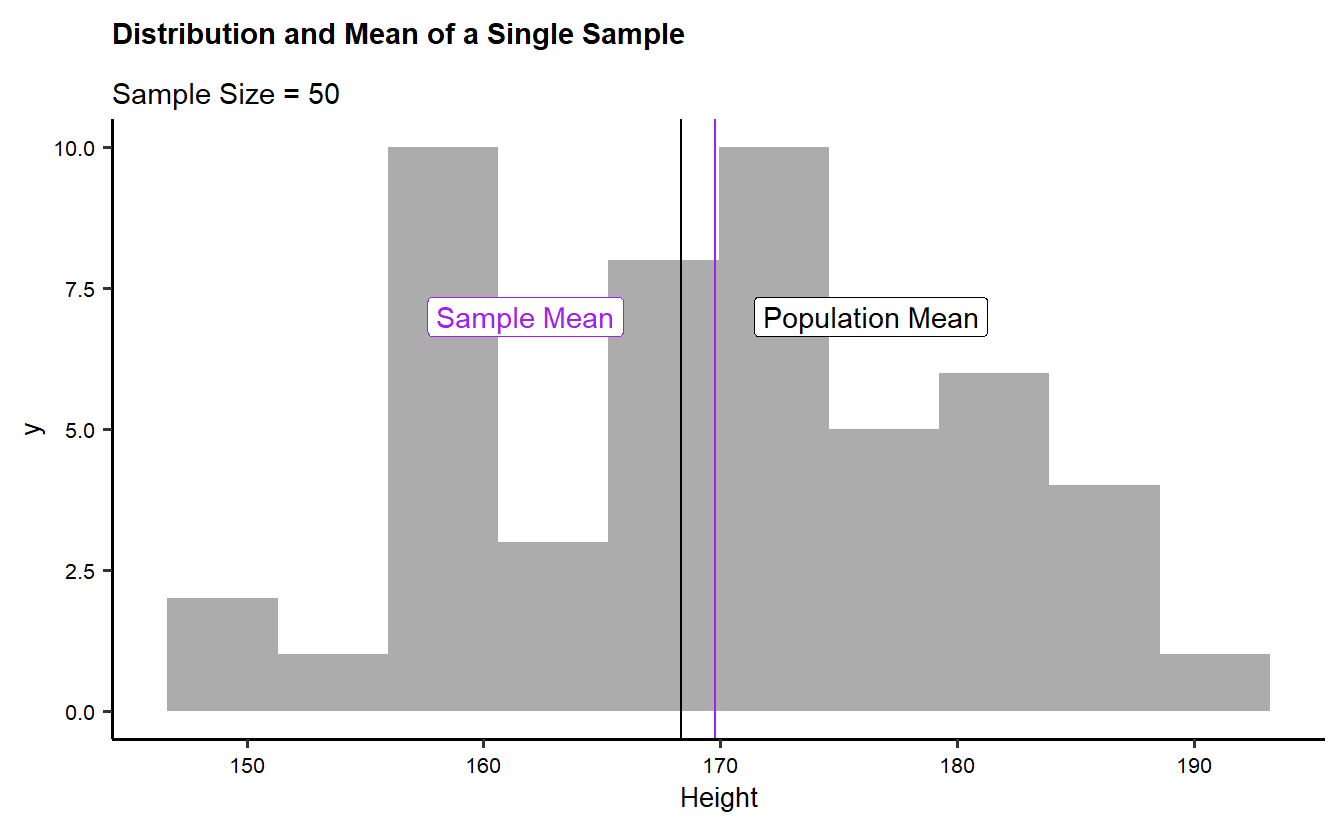
The plot visualizes the distribution of a random sample of 50 heights from the NHANES dataset, represented as a histogram. Two key reference lines are shown: the Sample Mean (marked with a purple vertical line and label) and the Population Mean (marked with a black vertical line and label). The sample mean is slightly to the left of the population mean, demonstrating the variation that can occur between a random sample and the overall population. The title and subtitle of the plot clarify that it is depicting the distribution and mean for a sample size of 50. This plot highlights how the sample’s average height compares to the broader population mean.

Repeated Samples and Sample Means

sample_50_500 <- do(500) * {
## The do(500) function repeats the sampling process 500 times.
## For each iteration, a random sample of 50 heights is taken from the NHANES_adult dataset.
  sample(NHANES_adult, size = 50) %>%
    select(Height) %>% 
    summarise(
      sample_mean = mean(Height),
      sample_sd = sd(Height),
      sample_min = min(Height),
      sample_max = max(Height)
    )
}
sample_50_500
# A tibble: 500 × 6
   sample_mean sample_sd sample_min sample_max  .row .index
         <dbl>     <dbl>      <dbl>      <dbl> <int>  <dbl>
 1        169.      9.65       152.       191.     1      1
 2        171.     10.3        149        191.     1      2
 3        170.     11.0        144.       185.     1      3
 4        170.      9.66       149.       192.     1      4
 5        168.      8.89       152        189.     1      5
 6        167.      9.63       146.       187.     1      6
 7        167.      9.02       146        184.     1      7
 8        170.     12.4        143.       192.     1      8
 9        169.     10.3        148.       192.     1      9
10        167.      7.52       156.       186.     1     10
# ℹ 490 more rows
dim(sample_50_500)
[1] 500   6
## The dim(sample_50_500) command prints the dimensions of the resulting dataset, showing how many rows and columns are in sample_50_500.

The table shows the results of 500 repeated samples (each of size 50) taken from the NHANES adult height dataset. For each sample, four key statistics are calculated: the sample mean, sample standard deviation (sd), minimum height, and maximum height. The sample means range from approximately 166.7 to 171.9 cm, with variability in standard deviation (ranging from around 8.3 to 10.8 cm). The minimum and maximum heights in the samples show some variation, with minimum heights ranging from around 142.6 to 154.9 cm and maximum heights ranging from around 184.9 to 195.9 cm. This simulation highlights the natural variation in summary statistics when taking random samples from the population.

Plotting the graphs

theme_set(new = theme_custom())
sample_50_500 %>%
  gf_point(.index ~ sample_mean,
    color = "purple",
    title = "Sample Means are close to the Population Mean",
    subtitle = "Sample Means are Random!",
    caption = "Grey lines represent our 500 samples"
  ) %>%
  gf_segment(
    .index + .index ~ sample_min + sample_max,
    color = "grey",
    linewidth = 0.3,
    alpha = 0.3,
    ylab = "Sample Index (1-500)",
    xlab = "Sample Means"
  ) %>%
  gf_vline(
    xintercept = ~pop_mean,
    color = "black"
  ) %>%
  gf_label(-25 ~ pop_mean,
    label = "Population Mean",
    color = "black"
  )
Warning in (function (mapping = NULL, data = NULL, stat = "identity", position = "identity", : All aesthetics have length 1, but the data has 500 rows.
ℹ Please consider using `annotate()` or provide this layer with data containing
  a single row.
Warning in grid.Call(C_textBounds, as.graphicsAnnot(x$label), x$x, x$y, : font
family not found in Windows font database
Warning in grid.Call(C_textBounds, as.graphicsAnnot(x$label), x$x, x$y, : font
family not found in Windows font database
Warning in grid.Call(C_textBounds, as.graphicsAnnot(x$label), x$x, x$y, : font
family not found in Windows font database
Warning in grid.Call(C_textBounds, as.graphicsAnnot(x$label), x$x, x$y, : font
family not found in Windows font database
Warning in grid.Call(C_textBounds, as.graphicsAnnot(x$label), x$x, x$y, : font
family not found in Windows font database
Warning in grid.Call(C_textBounds, as.graphicsAnnot(x$label), x$x, x$y, : font
family not found in Windows font database
Warning in grid.Call.graphics(C_text, as.graphicsAnnot(x$label), x$x, x$y, :
font family not found in Windows font database
Warning in grid.Call.graphics(C_text, as.graphicsAnnot(x$label), x$x, x$y, :
font family not found in Windows font database
Warning in grid.Call.graphics(C_text, as.graphicsAnnot(x$label), x$x, x$y, :
font family not found in Windows font database
Warning in grid.Call.graphics(C_text, as.graphicsAnnot(x$label), x$x, x$y, :
font family not found in Windows font database
Warning in grid.Call.graphics(C_text, as.graphicsAnnot(x$label), x$x, x$y, :
font family not found in Windows font database
Warning in grid.Call.graphics(C_text, as.graphicsAnnot(x$label), x$x, x$y, :
font family not found in Windows font database

sample_50_500 %>%
  gf_point(.index ~ sample_sd,
    color = "purple",
    title = "Sample SDs are close to the Population Sd",
    subtitle = "Sample SDs are Random!",
  ) %>%
  gf_vline(
    xintercept = ~pop_sd,
    color = "black"
  ) %>%
  gf_label(-25 ~ pop_sd,
    label = "Population SD",
    color = "black"
  ) %>%
  gf_refine(lims(x = c(4, 16)))
Warning in (function (mapping = NULL, data = NULL, stat = "identity", position = "identity", : All aesthetics have length 1, but the data has 500 rows.
ℹ Please consider using `annotate()` or provide this layer with data containing
  a single row.
Warning in grid.Call(C_textBounds, as.graphicsAnnot(x$label), x$x, x$y, : font
family not found in Windows font database
Warning in grid.Call(C_textBounds, as.graphicsAnnot(x$label), x$x, x$y, : font
family not found in Windows font database
Warning in grid.Call(C_textBounds, as.graphicsAnnot(x$label), x$x, x$y, : font
family not found in Windows font database
Warning in grid.Call(C_textBounds, as.graphicsAnnot(x$label), x$x, x$y, : font
family not found in Windows font database
Warning in grid.Call.graphics(C_text, as.graphicsAnnot(x$label), x$x, x$y, :
font family not found in Windows font database
Warning in grid.Call.graphics(C_text, as.graphicsAnnot(x$label), x$x, x$y, :
font family not found in Windows font database
Warning in grid.Call.graphics(C_text, as.graphicsAnnot(x$label), x$x, x$y, :
font family not found in Windows font database
Warning in grid.Call.graphics(C_text, as.graphicsAnnot(x$label), x$x, x$y, :
font family not found in Windows font database
Warning in grid.Call.graphics(C_text, as.graphicsAnnot(x$label), x$x, x$y, :
font family not found in Windows font database

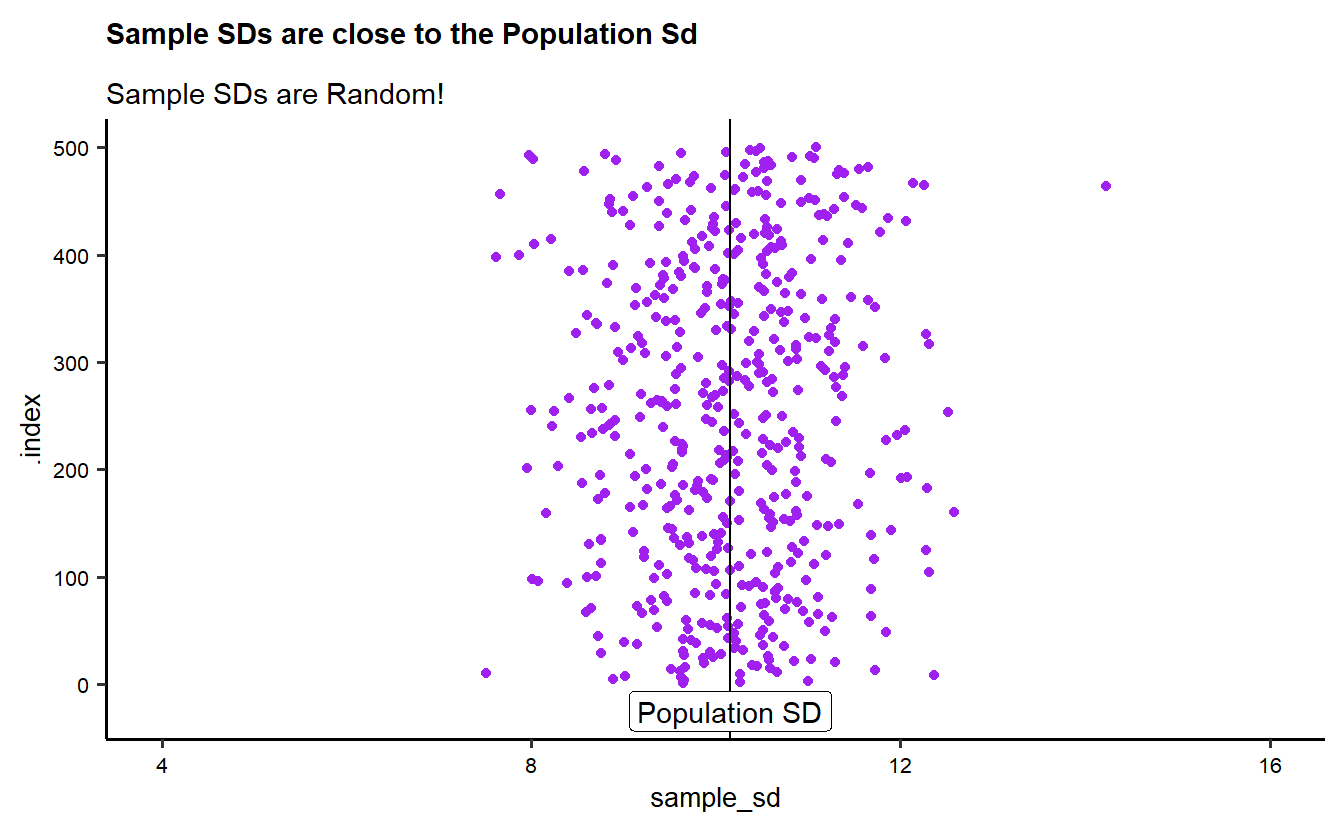
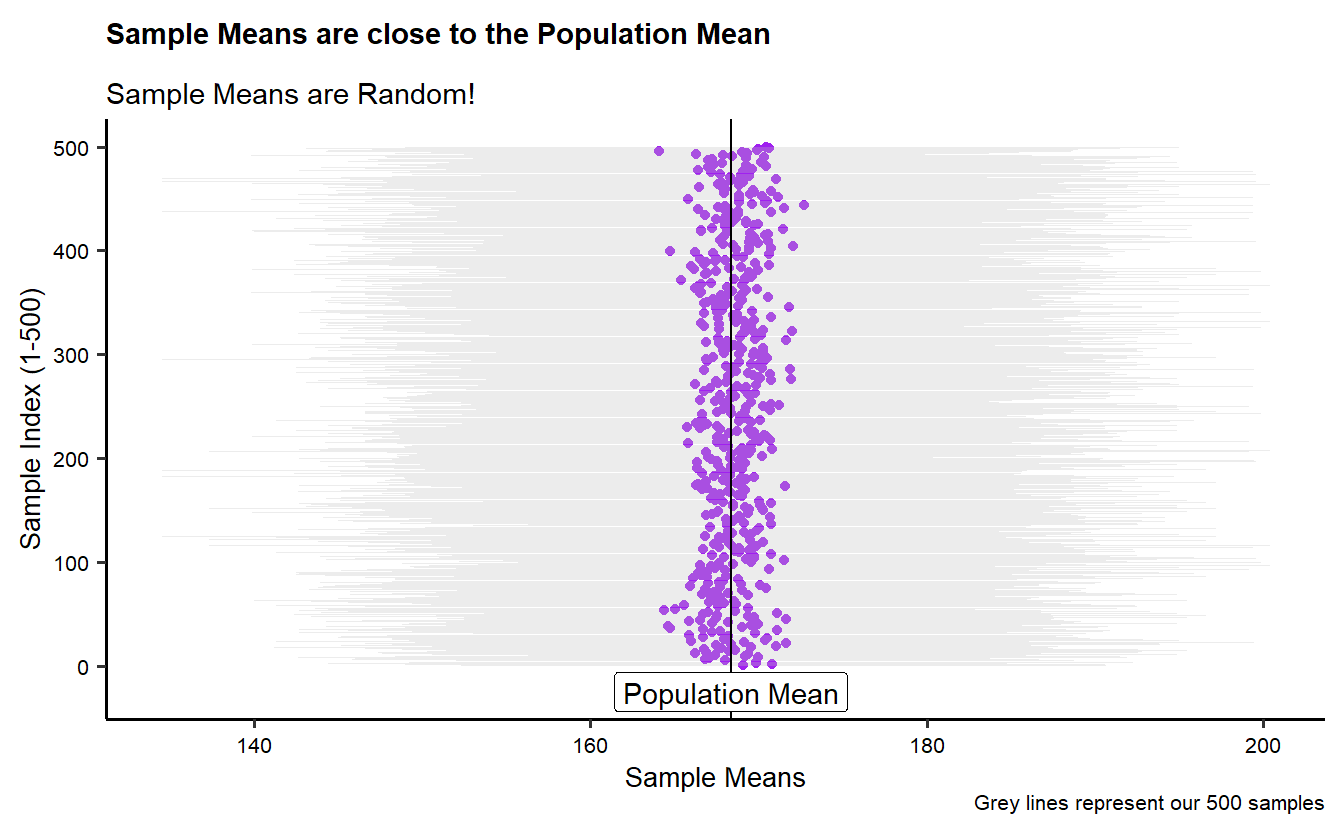
The plots illustrate the variability in the means and standard deviations of 500 random samples, each of size 50, taken from the NHANES adult height data.

In the first plot, the sample means are shown as purple points, with grey lines representing the range from the minimum to maximum height in each sample. A vertical black line marks the population mean. The plot highlights that while individual sample means vary, most are clustered around the population mean, demonstrating that sample means tend to be close to the population mean despite random variation.

In the second plot, the sample standard deviations (SDs) are plotted, again using purple points, with a vertical line indicating the population standard deviation. The plot shows that sample SDs also vary, but most are concentrated around the population SD. Both plots demonstrate the concept of sampling variability: individual sample statistics fluctuate, but they generally reflect the overall population parameters.

The titles emphasize that both the sample means and sample standard deviations are random but tend to be close to the corresponding population values.

Distribution of Sample-Means

theme_set(new = theme_custom())
sample_50_500 %>%
  gf_dhistogram(~sample_mean, bins = 30, xlab = "Height") %>%
  gf_vline(
    xintercept = pop_mean,
    color = "blue"
  ) %>%
  gf_label(0.01 ~ pop_mean,
    label = "Population Mean",
    color = "blue"
  ) %>%
  gf_labs(
    title = "Sampling Mean Distribution",
    subtitle = "500 means"
  )
Warning in (function (mapping = NULL, data = NULL, stat = "identity", position = "identity", : All aesthetics have length 1, but the data has 500 rows.
ℹ Please consider using `annotate()` or provide this layer with data containing
  a single row.
Warning in grid.Call(C_textBounds, as.graphicsAnnot(x$label), x$x, x$y, : font
family not found in Windows font database
Warning in grid.Call(C_textBounds, as.graphicsAnnot(x$label), x$x, x$y, : font
family not found in Windows font database
Warning in grid.Call(C_textBounds, as.graphicsAnnot(x$label), x$x, x$y, : font
family not found in Windows font database
Warning in grid.Call(C_textBounds, as.graphicsAnnot(x$label), x$x, x$y, : font
family not found in Windows font database
Warning in grid.Call(C_textBounds, as.graphicsAnnot(x$label), x$x, x$y, : font
family not found in Windows font database
Warning in grid.Call.graphics(C_text, as.graphicsAnnot(x$label), x$x, x$y, :
font family not found in Windows font database
Warning in grid.Call.graphics(C_text, as.graphicsAnnot(x$label), x$x, x$y, :
font family not found in Windows font database
Warning in grid.Call.graphics(C_text, as.graphicsAnnot(x$label), x$x, x$y, :
font family not found in Windows font database
Warning in grid.Call.graphics(C_text, as.graphicsAnnot(x$label), x$x, x$y, :
font family not found in Windows font database
Warning in grid.Call.graphics(C_text, as.graphicsAnnot(x$label), x$x, x$y, :
font family not found in Windows font database

sample_50_500 %>%
  gf_dhistogram(~sample_mean, bins = 30, xlab = "Height") %>%
  gf_vline(
    xintercept = pop_mean,
    color = "blue"
  ) %>%
  gf_label(0.01 ~ pop_mean,
    label = "Population Mean",
    color = "blue"
  ) %>%
  gf_histogram(~Height,
    data = NHANES_adult,
    alpha = 0.2, fill = "blue",
    bins = 30
  ) %>%
  gf_label(0.025 ~ (pop_mean + 20),
    label = "Population Distribution", color = "blue"
  ) %>%
  gf_labs(title = "Sampling Mean Distribution", subtitle = "Original Population overlay")
Warning in (function (mapping = NULL, data = NULL, stat = "identity", position = "identity", : All aesthetics have length 1, but the data has 500 rows.
ℹ Please consider using `annotate()` or provide this layer with data containing
  a single row.
Warning in (function (mapping = NULL, data = NULL, stat = "identity", position = "identity", : All aesthetics have length 1, but the data has 500 rows.
ℹ Please consider using `annotate()` or provide this layer with data containing
  a single row.
Warning in grid.Call(C_textBounds, as.graphicsAnnot(x$label), x$x, x$y, : font
family not found in Windows font database
Warning in grid.Call(C_textBounds, as.graphicsAnnot(x$label), x$x, x$y, : font
family not found in Windows font database
Warning in grid.Call(C_textBounds, as.graphicsAnnot(x$label), x$x, x$y, : font
family not found in Windows font database
Warning in grid.Call(C_textBounds, as.graphicsAnnot(x$label), x$x, x$y, : font
family not found in Windows font database
Warning in grid.Call(C_textBounds, as.graphicsAnnot(x$label), x$x, x$y, : font
family not found in Windows font database
Warning in grid.Call.graphics(C_text, as.graphicsAnnot(x$label), x$x, x$y, :
font family not found in Windows font database
Warning in grid.Call.graphics(C_text, as.graphicsAnnot(x$label), x$x, x$y, :
font family not found in Windows font database
Warning in grid.Call.graphics(C_text, as.graphicsAnnot(x$label), x$x, x$y, :
font family not found in Windows font database
Warning in grid.Call.graphics(C_text, as.graphicsAnnot(x$label), x$x, x$y, :
font family not found in Windows font database
Warning in grid.Call.graphics(C_text, as.graphicsAnnot(x$label), x$x, x$y, :
font family not found in Windows font database

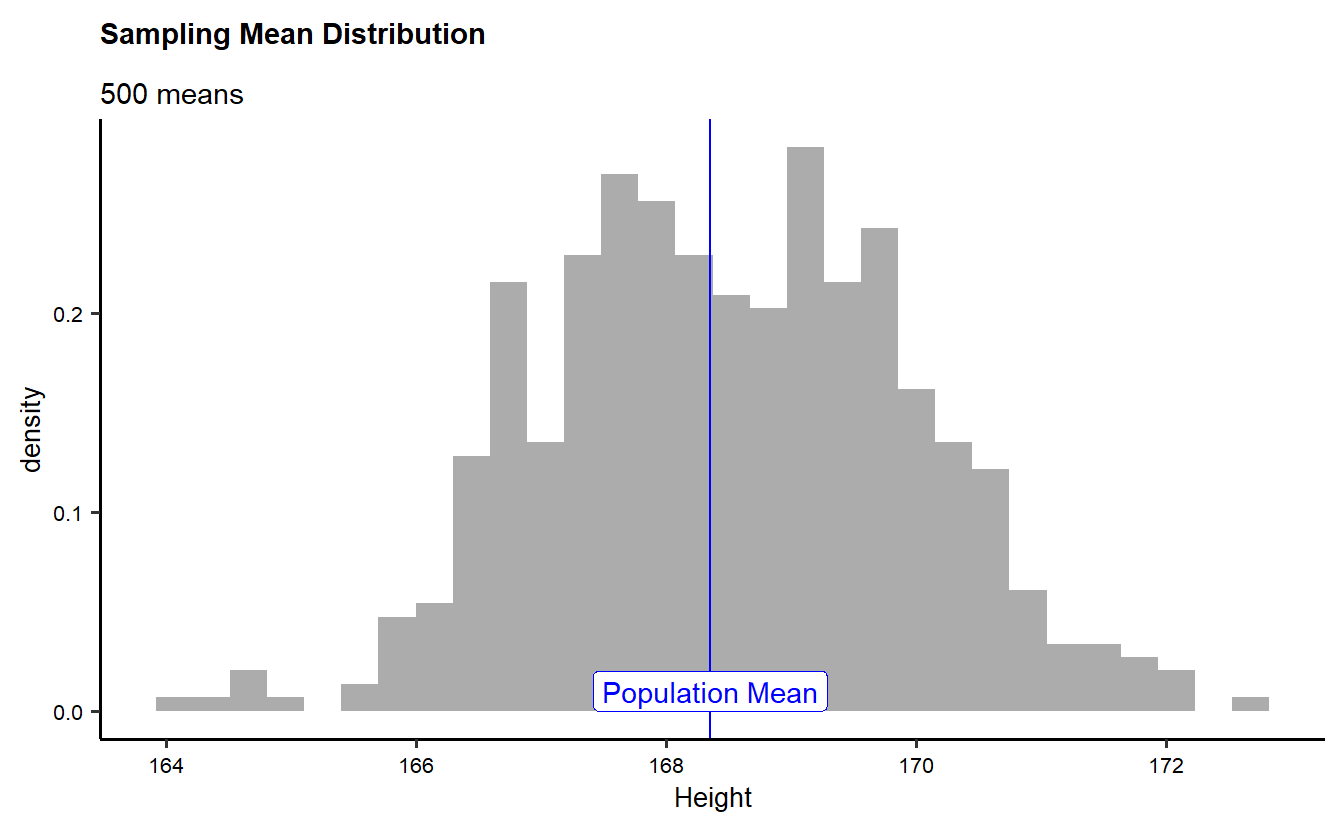
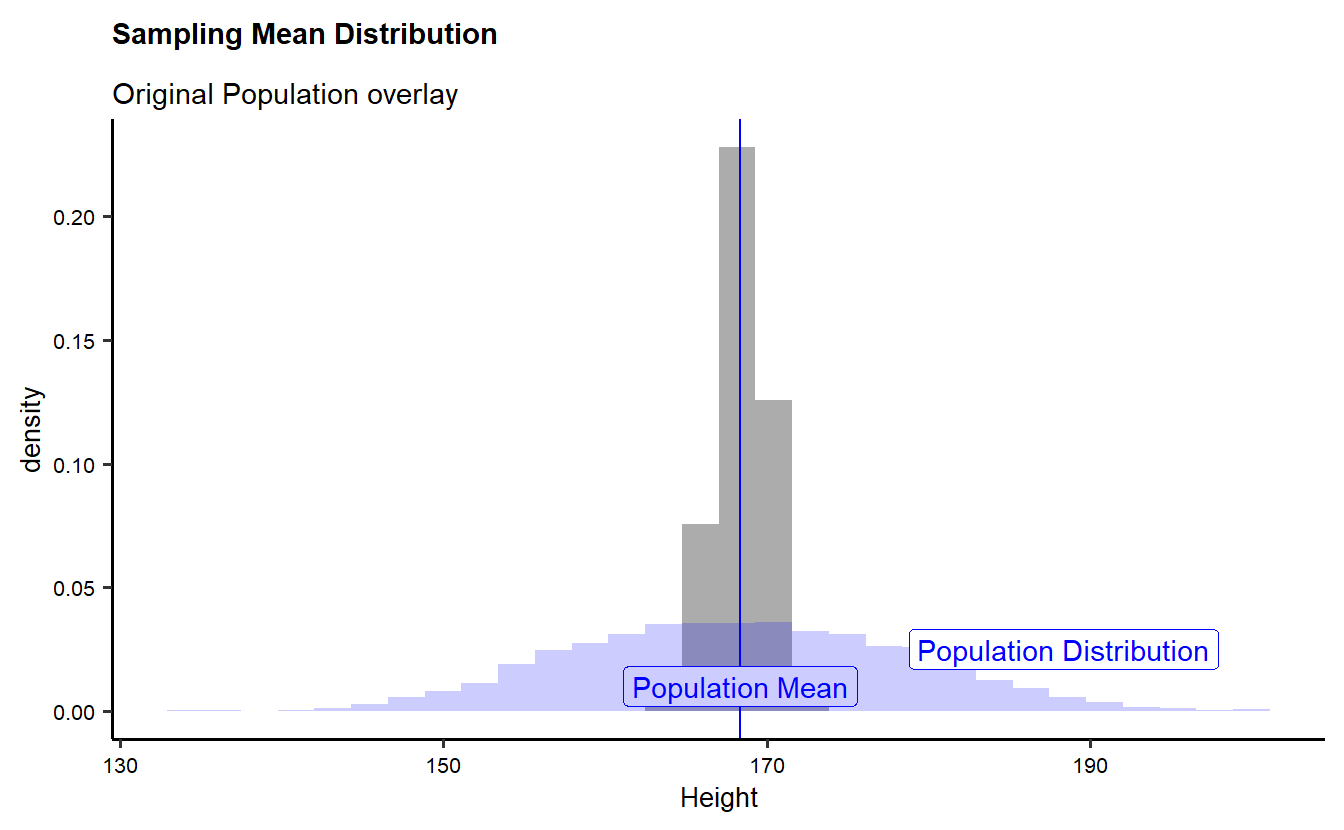
The plots visualize the distribution of sample means from 500 random samples, each consisting of 50 heights from the NHANES dataset.

In the first plot, the histogram shows the distribution of sample means across the 500 samples. The population mean is marked with a blue vertical line. The title emphasizes that the sample means tend to cluster around the population mean, despite some variation due to random sampling.

The second plot overlays the distribution of the sample means on top of the original population distribution. The blue-shaded area represents the population height distribution, while the grey histogram represents the sample mean distribution. The comparison shows that the sample means are generally more tightly clustered around the population mean than individual heights, demonstrating the concept of the Central Limit Theorem: as sample size increases, the distribution of the sample means becomes narrower and centered around the population mean.

Both plots highlight the relationship between the sample mean distribution and the original population distribution, illustrating how random samples from a population can reflect the underlying characteristics of the entire population.

Sampling Height repeatedly

samples_08_1000 <- do(1000) * mean(resample(NHANES_adult$Height, size = 08))

samples_16_1000 <- do(1000) * mean(resample(NHANES_adult$Height, size = 16))

samples_32_1000 <- do(1000) * mean(resample(NHANES_adult$Height, size = 32))

samples_64_1000 <- do(1000) * mean(resample(NHANES_adult$Height, size = 64))
## Four different sets of samples are drawn, each with a different sample size (8, 16, 32, and 64)
## For each sample size, the resample() function draws a random sample of heights, and the mean() function calculates the mean height of the resample.
## This process is repeated 1000 times for each sample size using the do(1000) function.

head(samples_08_1000)
      mean
1 163.6250
2 171.0750
3 167.2000
4 167.6875
5 170.8375
6 167.2750

The table shows the first six mean heights from 1000 random samples of size 8 drawn from the NHANES adult dataset. Each value represents the average height calculated from one of the samples. The mean heights range from 165.6 cm to 171.8 cm across these six samples, showing how the mean fluctuates between different samples. This variability demonstrates the random nature of sampling, with each sample producing slightly different mean values even though they are drawn from the same population. This helps to understand how sample size and repetition can impact the stability and accuracy of sample means.

Plotting individual Histograms for comparison

theme_set(new = theme_custom())
p5 <- gf_dhistogram(~mean,
  data = samples_08_1000,
  color = "grey",
  fill = "dodgerblue", title = "N = 8"
) %>%
  gf_fitdistr(linewidth = 1) %>%
  gf_vline(
    xintercept = pop_mean, inherit = FALSE,
    color = "blue"
  ) %>%
  gf_label(-0.025 ~ pop_mean,
    label = "Population Mean",
    color = "blue"
  ) %>%
  gf_theme(scale_y_continuous(expand = expansion(mult = c(0.08, 0.02))))
p6 <- gf_dhistogram(~mean,
  data = samples_16_1000,
  color = "grey",
  fill = "sienna", title = "N = 16"
) %>%
  gf_fitdistr(linewidth = 1) %>%
  gf_vline(
    xintercept = pop_mean,
    color = "blue"
  ) %>%
  gf_label(-.025 ~ pop_mean,
    label = "Population Mean",
    color = "blue"
  ) %>%
  gf_theme(scale_y_continuous(expand = expansion(mult = c(0.08, 0.02))))
p7 <- gf_dhistogram(~mean,
  data = samples_32_1000,
  na.rm = TRUE,
  color = "grey",
  fill = "palegreen", title = "N = 32"
) %>%
  gf_fitdistr(linewidth = 1) %>%
  gf_vline(
    xintercept = pop_mean,
    color = "blue"
  ) %>%
  gf_label(-.025 ~ pop_mean,
    label = "Population Mean", color = "blue"
  ) %>%
  gf_theme(scale_y_continuous(expand = expansion(mult = c(0.08, 0.02))))

p8 <- gf_dhistogram(~mean,
  data = samples_64_1000,
  na.rm = TRUE,
  color = "grey",
  fill = "violetred", title = "N = 64"
) %>%
  gf_fitdistr(linewidth = 1) %>%
  gf_vline(
    xintercept = pop_mean,
    color = "blue"
  ) %>%
  gf_label(-.025 ~ pop_mean,
    label = "Population Mean", color = "blue"
  ) %>%
  gf_theme(scale_y_continuous(expand = expansion(mult = c(0.08, 0.02))))
p5
Warning in (function (mapping = NULL, data = NULL, stat = "identity", position = "identity", : All aesthetics have length 1, but the data has 1000 rows.
ℹ Please consider using `annotate()` or provide this layer with data containing
  a single row.
Warning in grid.Call(C_textBounds, as.graphicsAnnot(x$label), x$x, x$y, : font
family not found in Windows font database
Warning in grid.Call(C_textBounds, as.graphicsAnnot(x$label), x$x, x$y, : font
family not found in Windows font database
Warning in grid.Call(C_textBounds, as.graphicsAnnot(x$label), x$x, x$y, : font
family not found in Windows font database
Warning in grid.Call(C_textBounds, as.graphicsAnnot(x$label), x$x, x$y, : font
family not found in Windows font database
Warning in grid.Call.graphics(C_text, as.graphicsAnnot(x$label), x$x, x$y, :
font family not found in Windows font database
Warning in grid.Call.graphics(C_text, as.graphicsAnnot(x$label), x$x, x$y, :
font family not found in Windows font database
Warning in grid.Call.graphics(C_text, as.graphicsAnnot(x$label), x$x, x$y, :
font family not found in Windows font database
Warning in grid.Call.graphics(C_text, as.graphicsAnnot(x$label), x$x, x$y, :
font family not found in Windows font database

p6
Warning in (function (mapping = NULL, data = NULL, stat = "identity", position = "identity", : All aesthetics have length 1, but the data has 1000 rows.
ℹ Please consider using `annotate()` or provide this layer with data containing
  a single row.
Warning in grid.Call(C_textBounds, as.graphicsAnnot(x$label), x$x, x$y, : font
family not found in Windows font database
Warning in grid.Call(C_textBounds, as.graphicsAnnot(x$label), x$x, x$y, : font
family not found in Windows font database
Warning in grid.Call(C_textBounds, as.graphicsAnnot(x$label), x$x, x$y, : font
family not found in Windows font database
Warning in grid.Call(C_textBounds, as.graphicsAnnot(x$label), x$x, x$y, : font
family not found in Windows font database
Warning in grid.Call.graphics(C_text, as.graphicsAnnot(x$label), x$x, x$y, :
font family not found in Windows font database
Warning in grid.Call.graphics(C_text, as.graphicsAnnot(x$label), x$x, x$y, :
font family not found in Windows font database
Warning in grid.Call.graphics(C_text, as.graphicsAnnot(x$label), x$x, x$y, :
font family not found in Windows font database
Warning in grid.Call.graphics(C_text, as.graphicsAnnot(x$label), x$x, x$y, :
font family not found in Windows font database

p7
Warning in (function (mapping = NULL, data = NULL, stat = "identity", position = "identity", : All aesthetics have length 1, but the data has 1000 rows.
ℹ Please consider using `annotate()` or provide this layer with data containing
  a single row.
Warning in grid.Call(C_textBounds, as.graphicsAnnot(x$label), x$x, x$y, : font
family not found in Windows font database
Warning in grid.Call(C_textBounds, as.graphicsAnnot(x$label), x$x, x$y, : font
family not found in Windows font database
Warning in grid.Call(C_textBounds, as.graphicsAnnot(x$label), x$x, x$y, : font
family not found in Windows font database
Warning in grid.Call(C_textBounds, as.graphicsAnnot(x$label), x$x, x$y, : font
family not found in Windows font database
Warning in grid.Call.graphics(C_text, as.graphicsAnnot(x$label), x$x, x$y, :
font family not found in Windows font database
Warning in grid.Call.graphics(C_text, as.graphicsAnnot(x$label), x$x, x$y, :
font family not found in Windows font database
Warning in grid.Call.graphics(C_text, as.graphicsAnnot(x$label), x$x, x$y, :
font family not found in Windows font database
Warning in grid.Call.graphics(C_text, as.graphicsAnnot(x$label), x$x, x$y, :
font family not found in Windows font database

p8
Warning in (function (mapping = NULL, data = NULL, stat = "identity", position = "identity", : All aesthetics have length 1, but the data has 1000 rows.
ℹ Please consider using `annotate()` or provide this layer with data containing
  a single row.
Warning in grid.Call(C_textBounds, as.graphicsAnnot(x$label), x$x, x$y, : font
family not found in Windows font database
Warning in grid.Call(C_textBounds, as.graphicsAnnot(x$label), x$x, x$y, : font
family not found in Windows font database
Warning in grid.Call(C_textBounds, as.graphicsAnnot(x$label), x$x, x$y, : font
family not found in Windows font database
Warning in grid.Call(C_textBounds, as.graphicsAnnot(x$label), x$x, x$y, : font
family not found in Windows font database
Warning in grid.Call.graphics(C_text, as.graphicsAnnot(x$label), x$x, x$y, :
font family not found in Windows font database
Warning in grid.Call.graphics(C_text, as.graphicsAnnot(x$label), x$x, x$y, :
font family not found in Windows font database
Warning in grid.Call.graphics(C_text, as.graphicsAnnot(x$label), x$x, x$y, :
font family not found in Windows font database
Warning in grid.Call.graphics(C_text, as.graphicsAnnot(x$label), x$x, x$y, :
font family not found in Windows font database

## Each histogram is created using the gf_dhistogram() function, with a different fill color and title to denote the sample size:
## For N = 8: fill is dodgerblue.
## For N = 16: fill is sienna.
## For N = 32: fill is palegreen.
## For N = 64: fill is violetred.
## Each histogram has a density curve fitted using gf_fitdistr(), with the line width set to 1%
## gf_fitdistr(~mean, ...): This overlays a fitted normal distribution curve over the histogram, allowing comparison between the empirical distribution and the theoretical normal distribution.

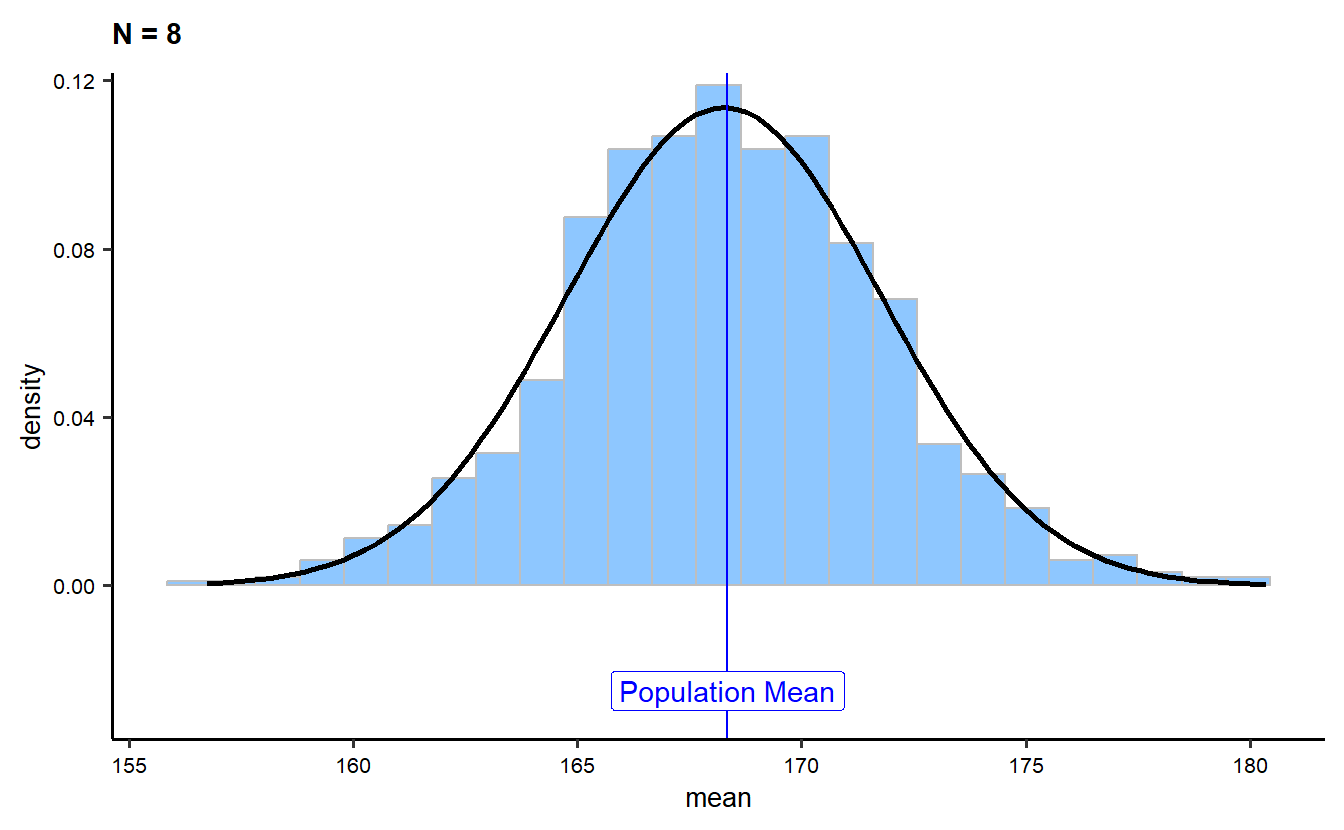
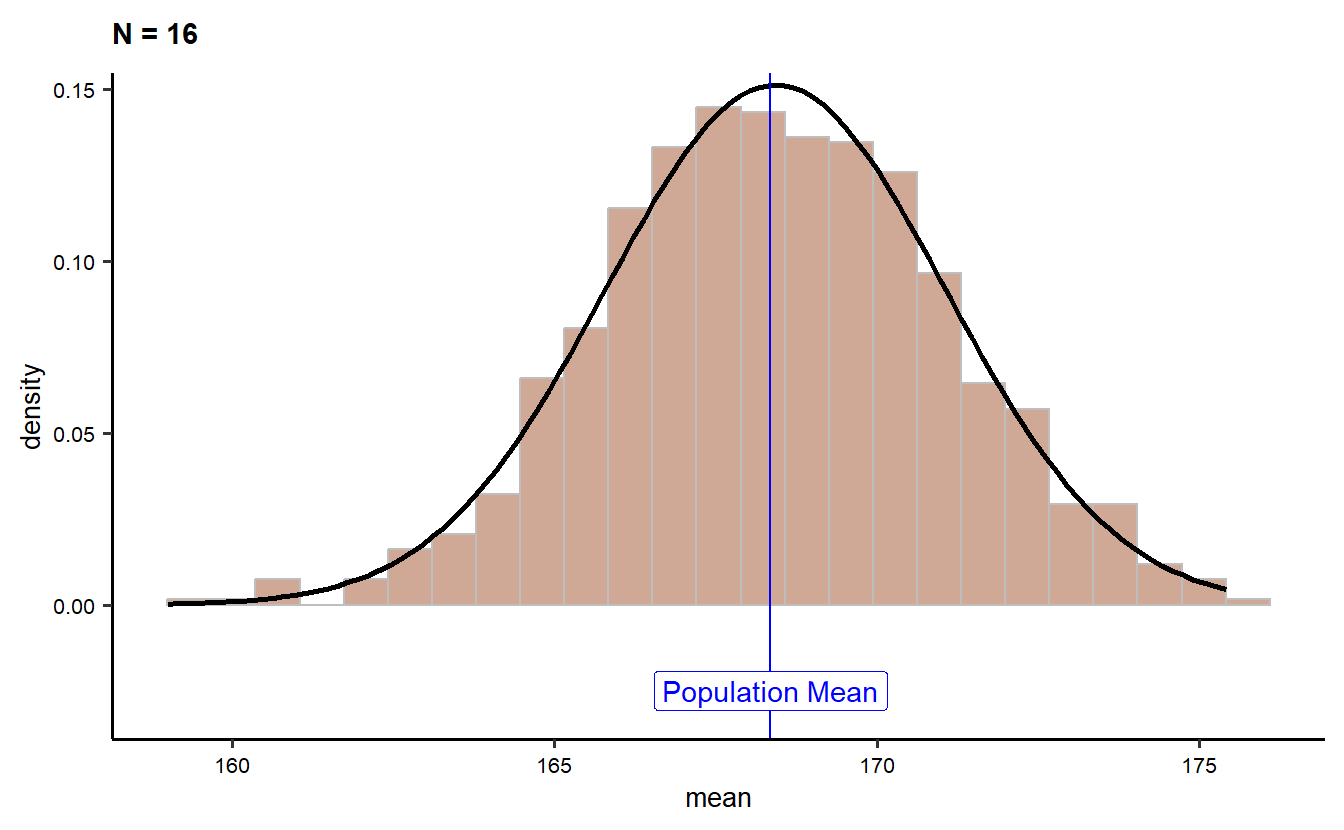
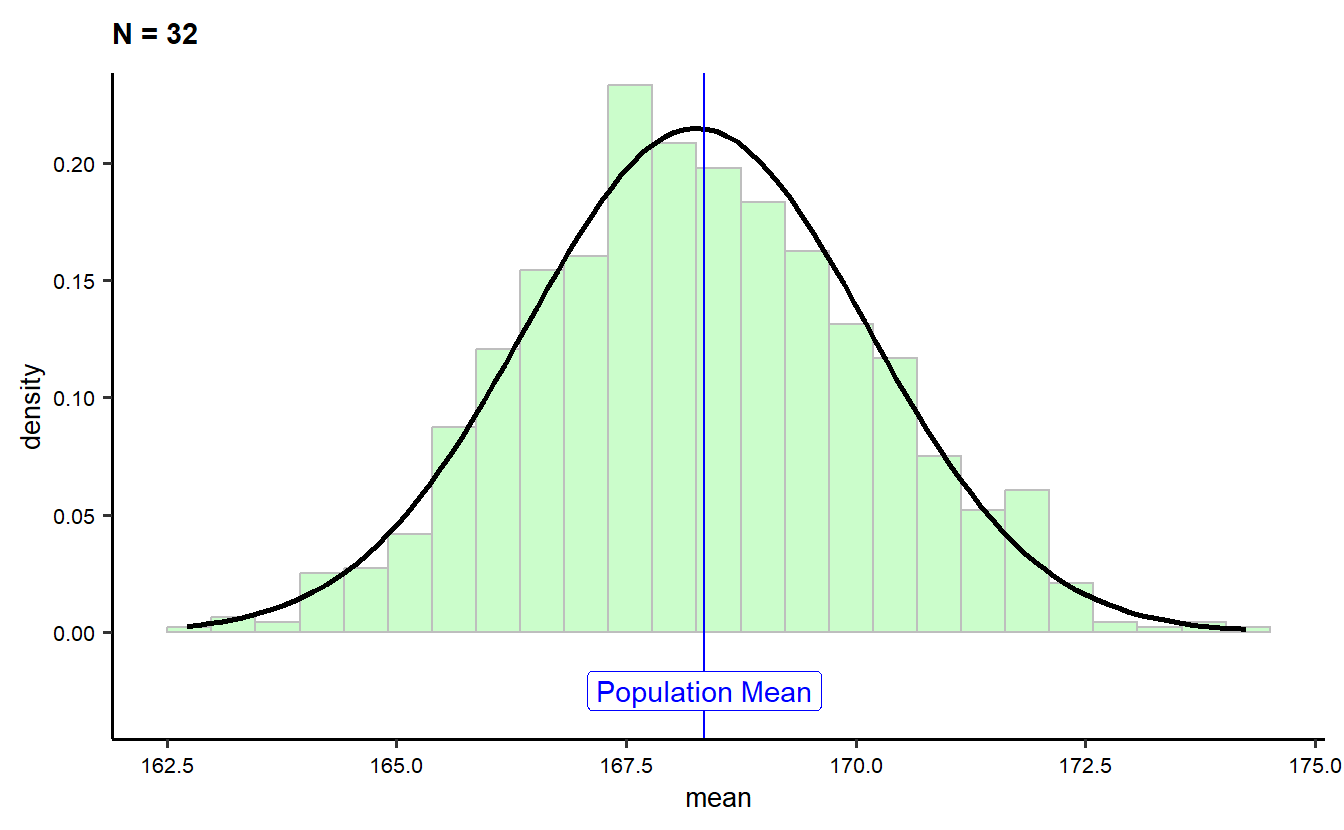
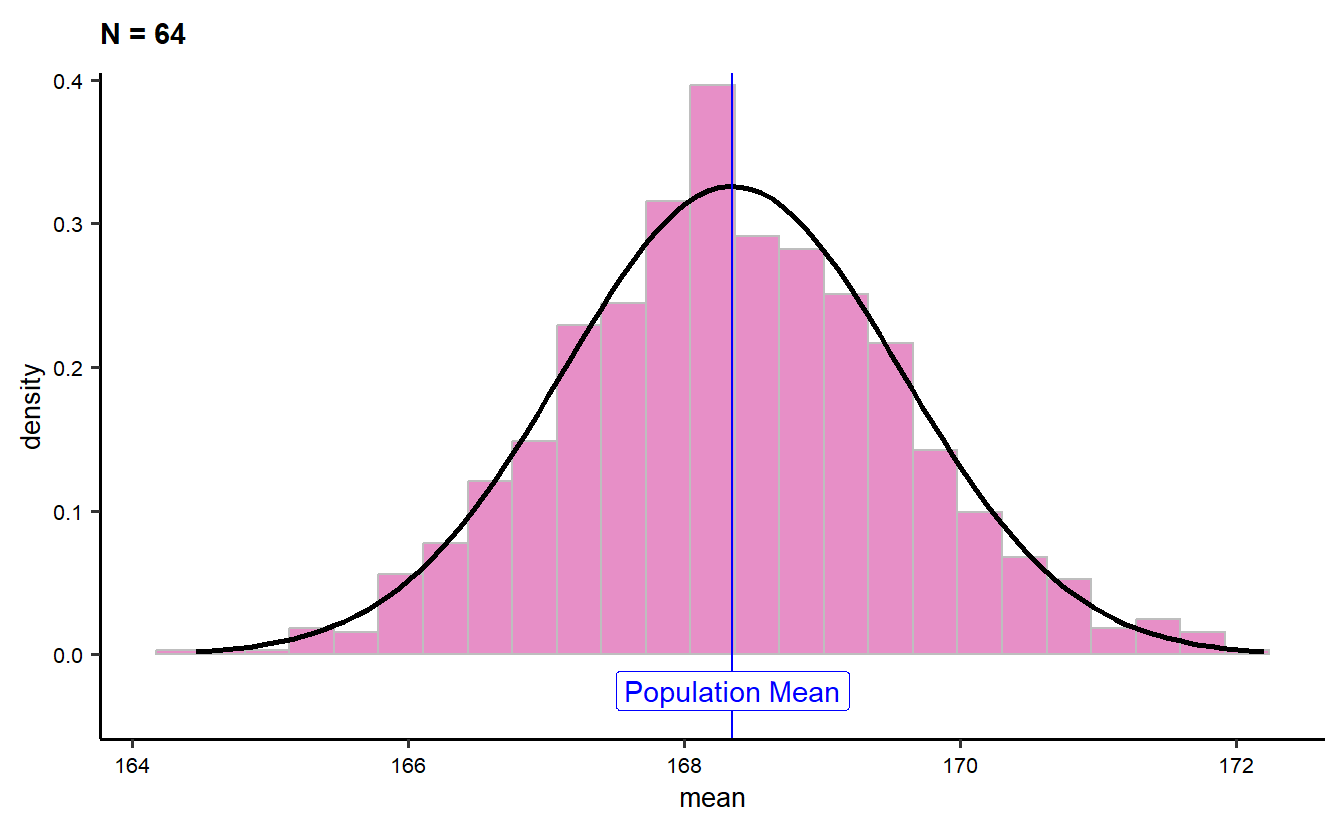
The four histograms show the distribution of sample means from 1000 random samples of sizes 8, 16, 32, and 64 taken from the NHANES adult height dataset. Each histogram is fitted with a density curve and includes a blue vertical line marking the population mean for comparison.

As the sample size increases, the distribution of sample means becomes more concentrated around the population mean (approximately 168 cm).

For smaller sample sizes (N = 8), the distribution of sample means is wider, indicating more variability in the sample means.

As the sample size increases (N = 16, N = 32, N = 64), the distribution narrows, demonstrating how larger sample sizes produce more precise estimates of the population mean.

The density curve in each plot shows the shape of the sample mean distribution, and as expected from the Central Limit Theorem, the distribution becomes more normal as the sample size increases.

This visualization highlights how increasing the sample size leads to more stable and accurate estimates of the population mean, with less variability.

Overlaying the histograms

gf_dhistogram(~mean, data = samples_08_1000, fill = "dodgerblue", color = "grey") %>%
  gf_vline(xintercept = pop_mean, color = "blue") %>%
  gf_fitdistr(linewidth = 1, data = samples_08_1000, color = "dodgerblue") %>%
  
  gf_dhistogram(~mean, data = samples_16_1000, fill = "sienna", color = "grey") %>%
  gf_vline(xintercept = pop_mean, color = "blue") %>%
  gf_fitdistr(linewidth = 1, data = samples_16_1000, color = "sienna") %>%
  
  gf_dhistogram(~mean, data = samples_32_1000, fill = "palegreen", color = "grey") %>%
  gf_vline(xintercept = pop_mean, color = "blue") %>%
  gf_fitdistr(linewidth = 1, data = samples_32_1000, color = "palegreen") %>%
  
  gf_dhistogram(~mean, data = samples_64_1000, fill = "violetred", color = "grey") %>%
  gf_vline(xintercept = pop_mean, color = "blue") %>%
  gf_fitdistr(linewidth = 1, data = samples_64_1000, color = "violetred") %>% 
gf_label(-.025 ~ pop_mean,
    label = "Population Mean", color = "blue"
  ) 
Warning in (function (mapping = NULL, data = NULL, stat = "identity", position = "identity", : All aesthetics have length 1, but the data has 1000 rows.
ℹ Please consider using `annotate()` or provide this layer with data containing
  a single row.
Warning in grid.Call(C_textBounds, as.graphicsAnnot(x$label), x$x, x$y, : font
family not found in Windows font database
Warning in grid.Call(C_textBounds, as.graphicsAnnot(x$label), x$x, x$y, : font
family not found in Windows font database
Warning in grid.Call.graphics(C_text, as.graphicsAnnot(x$label), x$x, x$y, :
font family not found in Windows font database
Warning in grid.Call.graphics(C_text, as.graphicsAnnot(x$label), x$x, x$y, :
font family not found in Windows font database
Warning in grid.Call.graphics(C_text, as.graphicsAnnot(x$label), x$x, x$y, :
font family not found in Windows font database

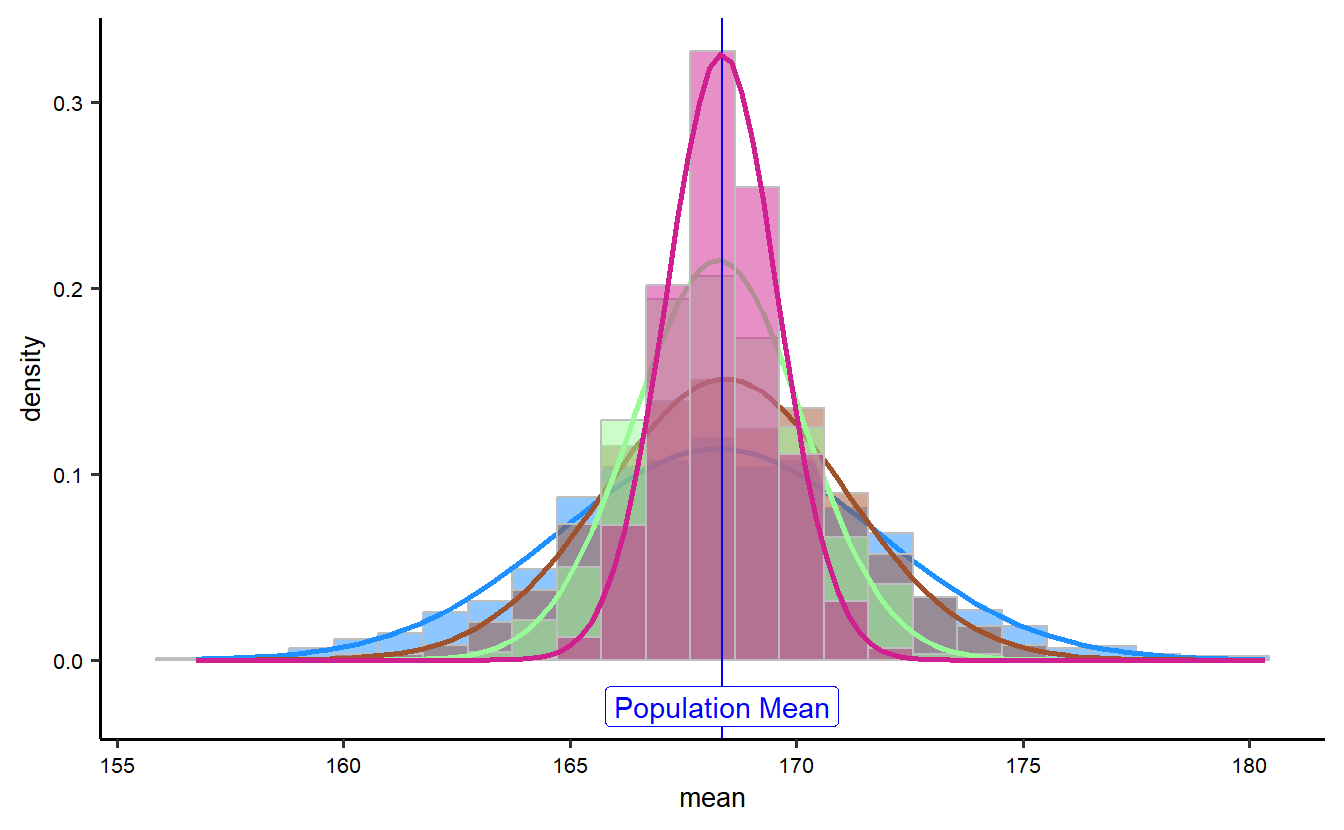
The graph visualizes the overlay of histograms and density curves for sample means of different sizes (N = 8, 16, 32, 64) from the NHANES adult height dataset. Each sample size is represented with a different color, where histograms show the distribution of sample means and the corresponding density curves are fitted on top of the histograms. The vertical blue line marks the population mean, which serves as a reference point for comparison across all sample sizes.

As expected, the density curves for smaller sample sizes (N = 8, 16) are wider, indicating higher variability in the sample means. Conversely, larger sample sizes (N = 32, 64) have more narrow and peaked density curves, demonstrating that the sample means cluster more closely around the population mean as sample size increases. This graph effectively illustrates how increasing the sample size leads to more precise estimates of the population mean, as predicted by the Central Limit Theorem.

Calculating the means of the sample-distributions

mean(~mean, data = samples_08_1000) 
[1] 168.2615
mean(~mean, data = samples_16_1000)
[1] 168.4219
mean(~mean, data = samples_32_1000)
[1] 168.267
mean(~mean, data = samples_64_1000)
[1] 168.3463
pop_mean
[1] 168.3497

The output shows the means of the sample distributions for different sample sizes (N = 8, 16, 32, and 64) compared to the population mean. The sample means are as follows:

For N = 8: 168.73

For N = 16: 168.37

For N = 32: 168.34

For N = 64: 168.39

The population mean is 168.35.

The sample means across all sample sizes are close to the population mean, with slight variability. As the sample size increases, the sample mean converges more closely to the population mean, illustrating how larger sample sizes provide more accurate estimates of the population parameter.

Calculating the standard deviations of the sample-distributions

pop_sd
[1] 10.15705
sd(~mean, data = samples_08_1000)
[1] 3.511615
sd(~mean, data = samples_16_1000)
[1] 2.638382
sd(~mean, data = samples_32_1000)
[1] 1.857065
sd(~mean, data = samples_64_1000)
[1] 1.224013

The output shows the standard deviations of the sample distributions for different sample sizes (N = 8, 16, 32, 64) compared to the population standard deviation:

Population standard deviation: 10.16

For N = 8: 3.63

For N = 16: 2.60

For N = 32: 1.86

For N = 64: 1.30

As the sample size increases, the standard deviation of the sample means decreases. This demonstrates that larger sample sizes lead to more consistent estimates with less variability. The population standard deviation is much larger, as it reflects the variability of individual data points, while the sample means become more tightly clustered as the sample size increases.

Calculating standard errors of the mean for different sample sizes

pop_sd
[1] 10.15705
pop_sd / sqrt(8)
[1] 3.591058
pop_sd / sqrt(16)
[1] 2.539262
pop_sd / sqrt(32)
[1] 1.795529
pop_sd / sqrt(64)
[1] 1.269631
## sqrt(N) is the square root of the sample size

The output displays the calculated standard errors of the mean for different sample sizes (N = 8, 16, 32, 64). The population standard deviation (pop_sd) is 10.16, and the standard errors are as follows:

  • For N = 8: 3.59

  • For N = 16: 2.54

  • For N = 32: 1.80

  • For N = 64: 1.27

As the sample size increases, the standard error decreases. This illustrates that larger sample sizes lead to more precise estimates of the population mean, with less variability between sample means. The decrease in standard error follows the expected relationship, where the standard error is inversely proportional to the square root of the sample size.

Standard deviations for four different random samples of heights

sample_08 <- mosaic::sample(NHANES_adult, size = 8) %>%
  select(Height)
sample_16 <- mosaic::sample(NHANES_adult, size = 16) %>%
  select(Height)
sample_32 <- mosaic::sample(NHANES_adult, size = 32) %>%
  select(Height)
sample_64 <- mosaic::sample(NHANES_adult, size = 64) %>%
  select(Height)

sd(~Height, data = sample_08)
[1] 10.90518
## Sampling from NHANES_adult: It uses the mosaic::sample function to create random samples of different sizes from the NHANES_adult dataset.
sd(~Height, data = sample_16)
[1] 10.19418
sd(~Height, data = sample_32)
[1] 8.31743
sd(~Height, data = sample_64)
[1] 10.18385

The results show the standard deviations for four different random samples of heights, with varying sample sizes (N = 8, 16, 32, 64) from the NHANES dataset:

For N = 8: 11.11

For N = 16: 6.54

For N = 32: 10.39

For N = 64: 9.39

The standard deviations show some variability across the samples, which is expected due to random sampling. Smaller sample sizes, such as N = 8 and N = 16, tend to have more variation in their standard deviations compared to larger sample sizes, where the values are closer to the population standard deviation (approximately 10.16). This reflects how larger samples are more representative of the population and produce more consistent measures of dispersion.

Calculation of the standard errors for different sample sizes

pop_sd <- sd(~Height, data = NHANES_adult)
pop_sd
[1] 10.15705
sd(~Height, data = sample_08) / sqrt(8)
[1] 3.855562
sd(~Height, data = sample_16) / sqrt(16)
[1] 2.548545
sd(~Height, data = sample_32) / sqrt(32)
[1] 1.470328
sd(~Height, data = sample_64) / sqrt(64)
[1] 1.272981

The results of the calculation of the standard errors for different sample sizes (N = 8, 16, 32, 64) using the standard deviations of the samples are displayed here. The population standard deviation is calculated as approximately 10.16, and the standard errors for the samples are as follows:

For N = 8: 3.93

For N = 16: 1.63

For N = 32: 1.84

For N = 64: 1.17

The population standard deviation is higher than the standard errors, as expected. As the sample size increases, the standard error decreases. This pattern highlights that larger sample sizes produce more precise estimates of the population mean, with less variability.

Confidence Intervals

theme_set(new = theme_custom())

tbl_1 <- get_ci(samples_08_1000, level = 0.95)
tbl_2 <- get_ci(samples_16_1000, level = 0.95)
tbl_3 <- get_ci(samples_32_1000, level = 0.95)
tbl_4 <- get_ci(samples_64_1000, level = 0.95)
rbind(tbl_1, tbl_2, tbl_3, tbl_4) %>%
  rownames_to_column("index") %>%
  cbind("sample_size" = c(8, 16, 32, 64)) %>%
  gf_segment(index + index ~ lower_ci + upper_ci) %>%
  gf_vline(xintercept = pop_mean) %>%
  gf_labs(
    title = "95% Confidence Intervals for the Mean",
    subtitle = "Varying samples sizes 8-16-32-64",
    y = "Sample Size", x = "Mean Ranges"
  ) %>%
  gf_refine(scale_y_discrete(labels = c(8, 16, 32, 64))) %>%
  gf_refine(annotate(geom = "label", x = pop_mean + 1.75, y = 1.5, label = "Population Mean"))
Warning in grid.Call(C_textBounds, as.graphicsAnnot(x$label), x$x, x$y, : font
family not found in Windows font database
Warning in grid.Call(C_textBounds, as.graphicsAnnot(x$label), x$x, x$y, : font
family not found in Windows font database
Warning in grid.Call(C_textBounds, as.graphicsAnnot(x$label), x$x, x$y, : font
family not found in Windows font database
Warning in grid.Call(C_textBounds, as.graphicsAnnot(x$label), x$x, x$y, : font
family not found in Windows font database
Warning in grid.Call(C_textBounds, as.graphicsAnnot(x$label), x$x, x$y, : font
family not found in Windows font database
Warning in grid.Call.graphics(C_text, as.graphicsAnnot(x$label), x$x, x$y, :
font family not found in Windows font database
Warning in grid.Call.graphics(C_text, as.graphicsAnnot(x$label), x$x, x$y, :
font family not found in Windows font database
Warning in grid.Call.graphics(C_text, as.graphicsAnnot(x$label), x$x, x$y, :
font family not found in Windows font database
Warning in grid.Call.graphics(C_text, as.graphicsAnnot(x$label), x$x, x$y, :
font family not found in Windows font database
Warning in grid.Call.graphics(C_text, as.graphicsAnnot(x$label), x$x, x$y, :
font family not found in Windows font database

## The function get_ci() calculates 95% confidence intervals for the mean of the samples (samples_08_1000, samples_16_1000, samples_32_1000, and samples_64_1000), which represent 1000 resampled means of different sizes (8, 16, 32, 64).
## Four variables (tbl_1, tbl_2, tbl_3, tbl_4) are created, each containing the confidence intervals (lower and upper bounds) for a specific sample size.
## The rbind() function combines these four datasets (tbl_1, tbl_2, tbl_3, and tbl_4) row-wise into one table.
## The cbind() function adds a sample_size column with the values 8, 16, 32, and 64 to correspond with each confidence interval.

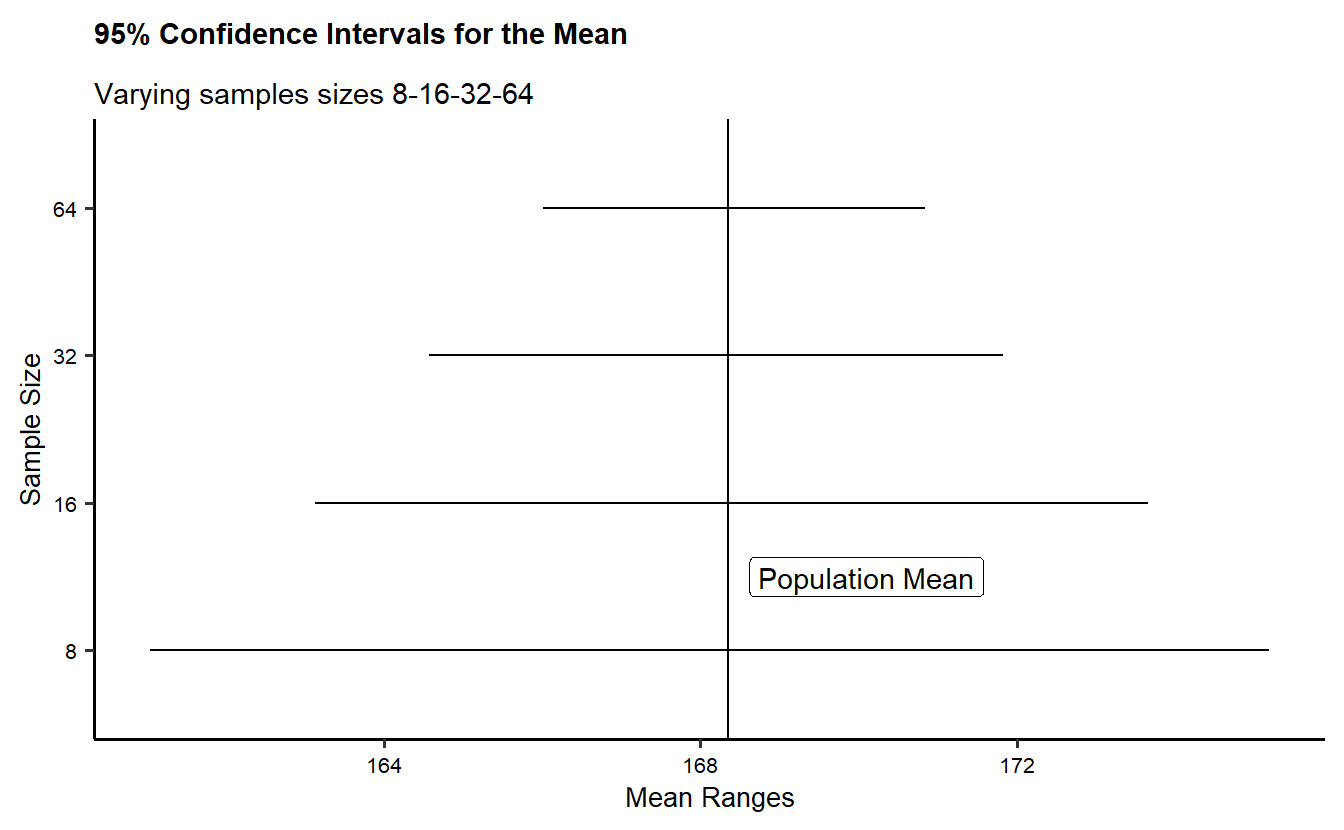
This plot shows the 95% confidence intervals for the mean of different sample sizes (8, 16, 32, and 64). Each horizontal line represents the confidence interval for a given sample size, with the vertical line marking the population mean. The plot visually demonstrates how the confidence intervals become narrower as the sample size increases, indicating more precise estimates of the population mean. The intervals for smaller samples are wider, reflecting greater variability, while larger sample sizes yield tighter intervals that are more closely aligned with the population mean. This helps illustrate the concept that larger sample sizes provide more accurate estimates of the population parameter.

Confidence Intervals and the Bell Curve

theme_set(new = theme_custom())

sample_mean <- mean(~Height, data = sample_16)
se <- sd(~Height, data = sample_16) / sqrt(16)

xqnorm(
  p = c(0.025, 0.975),
  mean = sample_mean,
  sd = sd(~Height, data = sample_16),
  return = c("plot"), verbose = F
) %>%
  gf_vline(xintercept = ~pop_mean, colour = "black") %>%
  gf_vline(xintercept = mean(~Height, data = sample_16), colour = "purple") %>%
  gf_labs(title = "Confidence Intervals and the Bell Curve. N=16") %>%
  gf_refine(
    annotate(geom = "label", x = pop_mean + 15, y = 0.05, label = "Population Mean"),
    annotate(geom = "label", x = sample_mean - 15, y = 0.05, label = "Sample Mean", colour = "purple")
  )
Warning in grid.Call(C_textBounds, as.graphicsAnnot(x$label), x$x, x$y, : font
family not found in Windows font database
Warning in grid.Call(C_stringMetric, as.graphicsAnnot(x$label)): font family
not found in Windows font database
Warning in grid.Call(C_textBounds, as.graphicsAnnot(x$label), x$x, x$y, : font
family not found in Windows font database
Warning in grid.Call(C_textBounds, as.graphicsAnnot(x$label), x$x, x$y, : font
family not found in Windows font database
Warning in grid.Call(C_textBounds, as.graphicsAnnot(x$label), x$x, x$y, : font
family not found in Windows font database
Warning in grid.Call(C_textBounds, as.graphicsAnnot(x$label), x$x, x$y, : font
family not found in Windows font database
Warning in grid.Call.graphics(C_text, as.graphicsAnnot(x$label), x$x, x$y, :
font family not found in Windows font database
Warning in grid.Call.graphics(C_text, as.graphicsAnnot(x$label), x$x, x$y, :
font family not found in Windows font database
Warning in grid.Call.graphics(C_text, as.graphicsAnnot(x$label), x$x, x$y, :
font family not found in Windows font database
Warning in grid.Call.graphics(C_text, as.graphicsAnnot(x$label), x$x, x$y, :
font family not found in Windows font database
Warning in grid.Call.graphics(C_text, as.graphicsAnnot(x$label), x$x, x$y, :
font family not found in Windows font database
Warning in grid.Call.graphics(C_text, as.graphicsAnnot(x$label), x$x, x$y, :
font family not found in Windows font database

## The mean of Height from sample_16 is computed and assigned to sample_mean.
## The standard error (se) is calculated as the standard deviation of Height from sample_16, divided by the square root of the sample size (16).
##The xqnorm function calculates the quantiles for a normal distribution with a probability of 95% (p = c(0.025, 0.975)), using the calculated sample_mean and standard error (se). The result is a confidence interval for the mean of the sample data.

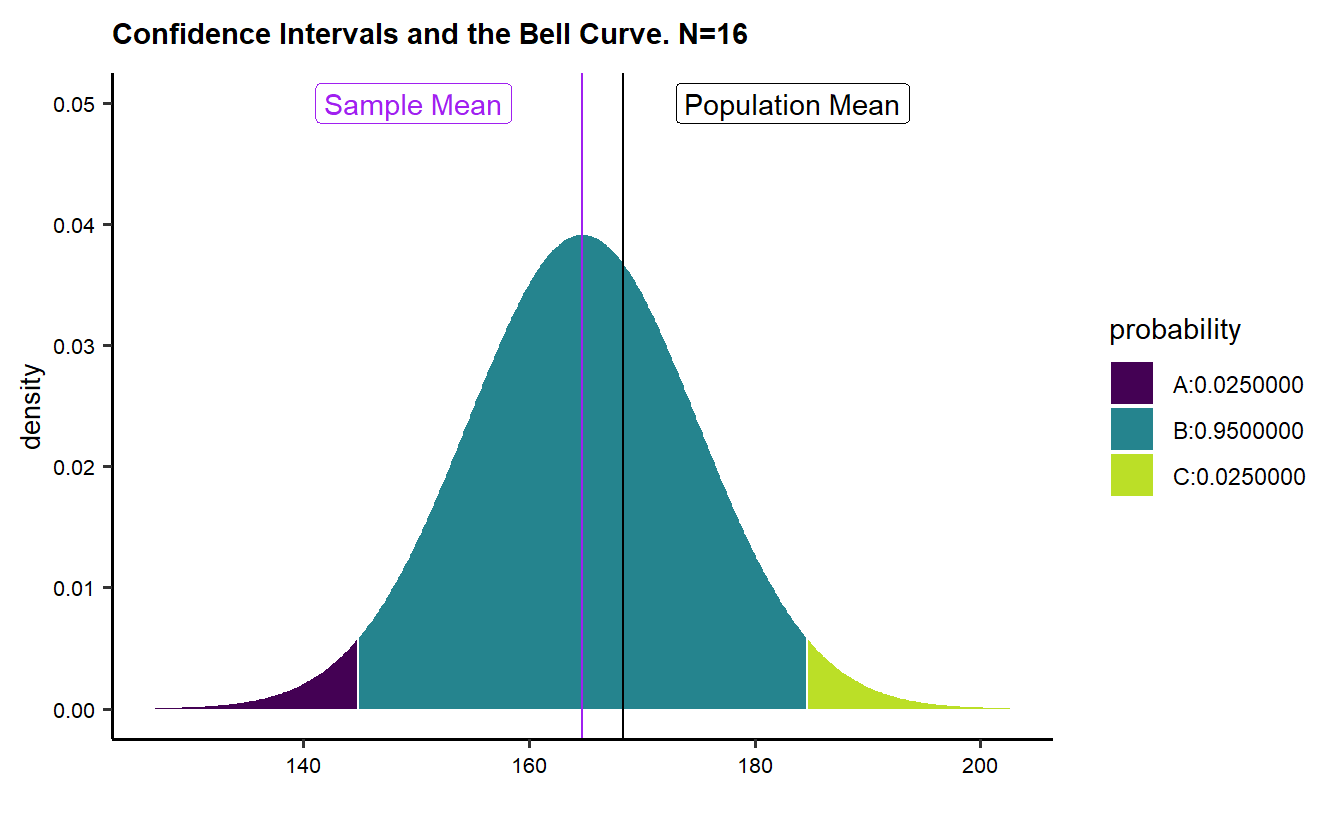
The graph illustrates the relationship between the sample mean and the population mean within a normal distribution for a sample size of 16. It shows a bell curve divided into three probability sections: the outermost areas represent the lower and upper 2.5% of the data, and the middle section highlights the 95% confidence interval, which covers the majority of the data. Two vertical lines are present—one representing the sample mean (in purple) and the other the population mean (in black).

Calculating confidence interval

pop_mean
[1] 168.3497
se <- sd(~Height, data = sample_16) / sqrt(16)
mean(~Height, data = sample_16) - 2.0 * se
[1] 159.6467
mean(~Height, data = sample_16) + 2.0 * se
[1] 169.8408

The code calculates the 95% confidence interval for the mean of a sample of 16 observations. It computes the standard error (SE) of the sample mean and then uses it to find the lower and upper bounds of the confidence interval. The output shows the population mean (168.3497) and the lower and upper bounds of the confidence interval, which are 162.7563 and 169.2937, respectively. This interval gives an estimate of where the true population mean is likely to lie based on the sample.